• info@wawasan.in
  • (+1)-832-493-2675

Project Overview

Overview

Dashboard Features

  • Elegant Dashboard UI for quick insights
  • Date-range filter to view total sales, purchase, and invoice numbers
  • Quick action buttons:
    • Create Sale
    • Create Purchase
    • Adjust Inventory
    • POS and Transactions
  • Summary Cards:
    • Total Sales
    • Total Sale Due
    • Total Purchases
    • Total Purchase Due
  • Recent Activities:
    • Recent Sales and Purchases
    • Stock Alerts and Transaction Overview
  • Store Selection Dropdown (multi-store capability)

Inventory Management

  • Product Management:
    • Add, edit, delete, and view products
    • Manage product stock by category
  • Shortage and Damaged Products Management
  • Stock Transfer between stores
  • Manufacturers Management

Purchase Management

  • Purchase Invoice Management:
    • Auto calculation of total, tax, and due amounts
    • View purchase history and payment status
  • Purchase Return Management with auto-adjustment of stock
  • Supplier Management:
    • Add, edit, view, or delete suppliers
    • Track purchase invoices and payment records

Sales Management

  • Sales Invoice Management:
    • Create invoices for customers
    • Manage due and paid invoices
    • Auto-update stock upon sales
  • Sales Returns Management with stock and payment adjustments
  • Customer Management:
    • Add, edit, view, or delete customers
    • Track invoices and payment records

HR Management

  • Staff Management: Add, edit, delete, and view staff members
  • Roles & Permissions Management:
    • Create and assign roles
    • Manage permissions with access control
  • Designation and Department Management
  • Shift and Employment Status Tracking

Accounting Management

  • General Ledger: View all transactions
  • Individual Ledger: Account-specific transactions
  • Financial Reports:
    • Trial Balance
    • Balance Sheet
    • Income Statement (Profit & Loss)

Reports and Analytics

  • Inventory Report
  • Sales Report (including profits and top customers)
  • Purchase Report
  • Supplier and Customer Reports
  • Adjustment Report for stock management

POS & PWA Features

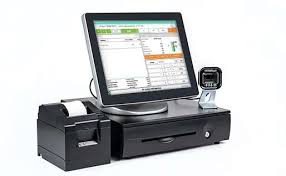
  • POS Interface for quick transactions
  • Thermal Invoice Printing
  • PWA Support for Android and iOS (mobile app)

Settings and Configuration

  • Company Settings: Manage company information
  • App Settings: Customize application features
  • Inventory Settings:
    • Manage product categories, brands, and attributes
    • Adjust inventory and manage units
  • Other Settings:
    • Coupon and Discount Settings
    • Currency and VAT/TAX Management

Store and Media Management

  • Manage multiple store branches
  • Media Module for managing files and images

Barcode and Bulk Operations

  • Barcode Generation and Printing
  • Packing Slip Printing
  • Bulk CSV Upload for products and data
  • Download data as CSV

Usability Features

  • Product and Record Search
  • Pagination and Filters for large datasets
  • Dynamic Invoice Header & Footer Editing
  • Datewise Data View in all reports and tables

Project Detail

  • Client Name:
  • Client Company Name:
  • Project Start Date:
  • Project End Date:
  • Client Comment:

Quick Contact

2 * 2 =

Recent Portfolio

See all our works that we do for our clients

Get a free quote for SAP Ariba Buying and Invoicing, SAP BPC, SAP GRCA Security, SAP All Modules, ERP, Web design development, and Mobile app creation.